Category

Pump Maintenance and Trouble Shooting

Correct Position of the Diaphragm in the Inlet Water Solenoid Valve

By | Pump Maintenance and Trouble Shooting

The Inlet Water Solenoid Valve is the first piece of hardware which the treated water supply to the high pressure pump enters.  Its’ function as a valve is to prevent low pressure water from flowing thru the pump while it is OFF or in STANDBY, and to allow water to flow thru to the pump while it is ON.

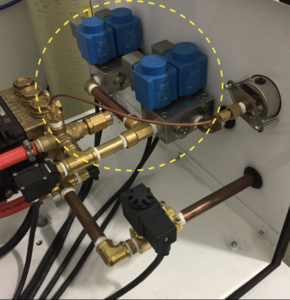
The graphic shows the location of the inlet water solenoid valve circled in yellow.
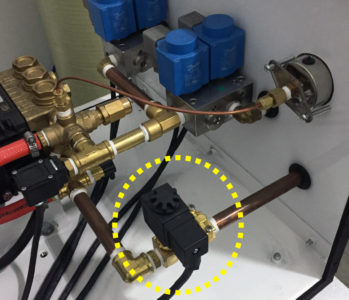
Supply water inlet solenoid valve (installed) for high pressure humidity control system

Supply water inlet solenoid valve (installed) in the Inlet Water Line  for a High Pressure Humidity Control System


The diaphragm inside the inlet water solenoid valve is the internal viton rubber component that prevents flow when the valve is not energized and allows flow when it is energized.  When the diaphragm is out of position or damaged, it may restrict flow when the valve is energized and it may allow water to flow when the valve is not energized.  Therefore, it is important to make sure when removing and inspecting the diaphragm, to replace it correctly vs incorrectly.  The following graphics are provided showing the top and bottom of the diaphragm and the correct positioning of the diaphragm when installed in the water solenoid valve.
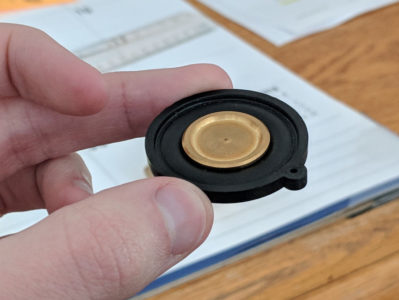
 

Top view of diaphragm for water inlet solenoid valve for a humidity control high pressure pump

Top view of the diaphragm for the water inlet solenoid valve for a humidity control high pressure pump.
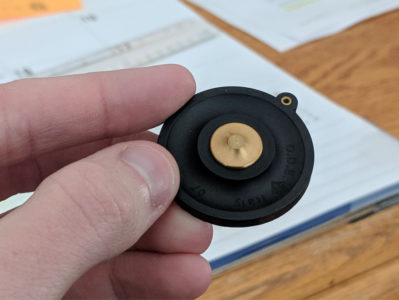
 

Bottom view of diaphragm for water inlet solenoid valve for a humidity control high pressure pump

Bottom view of the diaphragm for the water inlet solenoid valve for a humidity control high pressure pump.
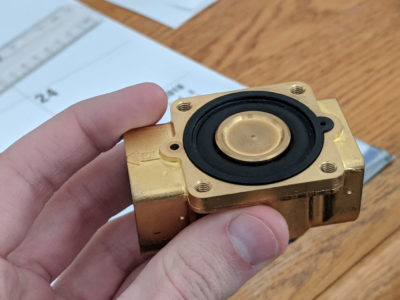
 

Top view of diaphragm installed CORRECTLY in a water inlet solenoid valve for a humidity control high pressure pump

Top view of the diaphragm installed CORRECTLY in a water inlet solenoid valve for a humidity control high pressure pump.
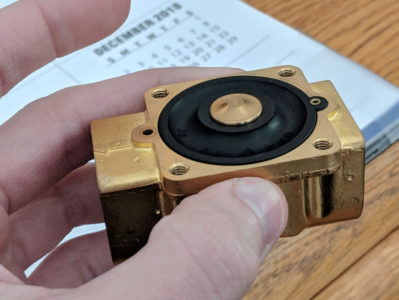
 

Diaphragm INCORRECTLY installed in a water inlet solenoid valve for a humidity control high pressure pump
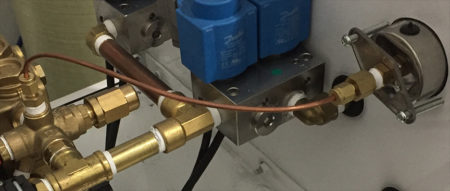
The Diaphragm INCORRECTLY installed in a water inlet solenoid valve for a humidity control high pressure pump
Checking the Coil, the DIN Connector, and the Power to the DIN Connector

By | Pump Maintenance and Trouble Shooting

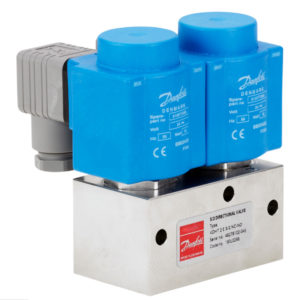
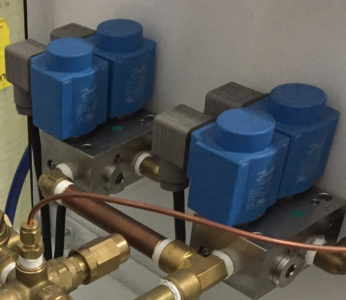
Inspecting the Danfoss EDV Valve and the Danfoss 3/2 Valves with EDV for signs of malfunction, should first include an inspection to make sure the DIN Connector and Power Cord are functioning correctly.  The following is a description of checking the DIN Connector with an image below showing four DIN Connectors connected to Zone Danfoss 3/2 Valves with EDV (drain) function built in.

Checking the coil, theDIN connector, and the power to theDIN connector is suggested as follows:

Initially, if you place your fingers on the coil and turn the pump on, you should feel the internal piston ‘clicking’ into position which means the coil, theDIN, and the valve are probably working as needed.  You can also sometimes hear the clicking (if it is a relatively quiet pump).

If you cannot determine the valve function using this simple test, check the coil by simply looking at it to make sure there are no protrusions (caused by a short in the coil and a resulting ‘explosion’ that changes the outer profile of the coil body).  You will typically see a bulging side or an actual hole in the coil body.

If the coil looks bad, it will need to be replaced.  To determine the cause (which is not always determinable), remove the coil from the valve stem and inspect the valve stem to see if there is any discoloration or rust or the presence of water that would cause the coil to short.  If there is, the valve stem will need to be replaced.  We have seen some of these stems fail at the point of the weld around the circumference of the stem allowing water to leak out which then causes the coil to fail.

If the coil does not look bad, remove the small Phillips screw from the front face of theDIN connector (the connector is the component that is attached to the three prongs on the coil) and remove theDIN connector from the coil.  Check the prongs for discoloration (usually carbon buildup as a result of a short circuit).  If there is obvious damage, the dDIN will need to be replaced.  This failure can be caused by moisture but more likely caused by the connections in theDIN connector being crossed or two of the wires touching.

If none of this leads to an answer, I would next place theDIN back on the coil leaving enough room to get the prongs from a multi meter between theDIN and the coil so that you can touch each prong to one of the top two prongs check to make sure the coil is actually getting the power from the source.  If there is no power at these prongs, then the power source for the coil is not being energized.

This is a standard DIN connector used with the Humidity Control Pump Station System.  It is used to provide the power supply to the valve coil (the blue component on the Danfoss valve and the black component on the Granzow [solenoid] valve).

DIN Connector and Power Cord to Danfoss 3/2 Valve

DIN Connector (gray) and Power Cord to Danfoss (blue) 3/2 Valves

Humidity Control Pre-Season Startup “Maintenance Checklist” for High Pressure Systems

By | Pump Maintenance and Trouble Shooting

Pre-Season “Maintenance Checklist” for Humidity Control System Startup

Regularly scheduled maintenance is the best preventative maintenance procedure to minimize unexpected breakdowns.  Learn to watch for signs from your pump station operation which may indicate maintenance may be needed.  The most common signs of needed maintenance are: a drop in pressure, fluctuating pressure, vibration, unusual noises, external leaking of water or oil, excessive pump heat, water in crankcase oil, and premature wear of parts.
The typical seasonal period for adding humidity begins around Oct 15 and ends around April 15.  Typically, there are two procedures for “year round” operation of the humidity control system.
  1. End of Season Shut Down: Shutting down (turning off) the total operation of the humidity control system for the off season requires all high pressure lines drained of water, OR;
  2. Leave the system operational all year, and during the off season, run the system for ten minutes once every two weeks to maintain fresh water in the lines – Note: You will need to set the humidistat(s) higher than indoor humidity levels in order to operate the system during the off season.
PRE-SEASON MAINTENANCE CHECKLIST:
  • Maintain a maintenance service log with date and maintenance performed.
  • Make a record of total pump hours as recorded on the pump hour meter at beginning of season.
  • Change the pump 5 micron sediment pre-filter at least once per operating season or clean as needed.
  • Check oil level and change once per year or every 500 hours of pump operation, whichever comes first.
  • Service Pump Packings and Seals every 2-2500 hours.
  • Check pulley belt which should have no more than 1/2” flex.
  • After system startup, check all nozzles for uniform spray pattern.  Some nozzles may need to be cleaned and reinserted. Tip: a simple procedure for cleaning nozzles – the head of the nozzle unscrews and the spring and ball with the valve can be removed. Soak all pieces in warm vinegar and water solution or soak in “Works” toilet bowl cleaner for 60 seconds, rinse and reassemble – you should have a new working nozzle with restored performance.
  • Note: In all cases where system operation may be malfunctioning, the first place to check are the fuses.  

How to Change the Belt on a High Pressure Humidity Control General “Type” Pump

By | Pump Maintenance and Trouble Shooting

Alignment of Motor:

The motor for the high pressure pump is mounted to a 2 piece base plate that allows the adjustment of the motor position (left and right) without having to loosen the 4 motor mounting bolts.  This ‘tension’ bolt is located on the back side of the motor base plate and moves the top section of the motor base plate to adjust tension.

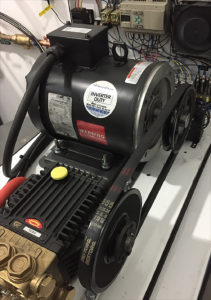
IF the motor and pump pulley are not properly aligned (visually identified by making sure the two pulleys are parallel to each other) , it will usually be a matter of loosening the four motor mounting bolts and slightly shifting the position of the motor until the pulley is ‘squared’ to the pump pulley.  The belt will have to be removed to release any tension and allow the motor to be slightly shifted.  This is rarely an issue but if the motor has shifted, this is how to remedy motor alignment for correct pulley operation with the high pressure pump as pictured.

Guidelines for Changing the Belt:

• The first thing you want to do is mark the existing location of the pump head base plate against the bottom of the housing.   This will help you line it back up easier.   A small black sharpie works well.

• Loosen the four bolts on the pump head base.

• Slide the pump head towards the motor.  This should allow you to get the old belt off.

• Put the new belt on.

• Slide the pump head back to the marks you made.    It is very important that the pump is lined up straight.   If not, it will cause premature wear of the belt.    To help with this, you can take a small piece of pipe or straight edge to ensure it is square on the outside of the pulley.    Your marks will also assist with this.

• The belt should be snug enough once you push the pump head back in place.  Make sure it does not flex more than 1/2″.

Motor and Pulley Alignment of Belt with General Type High Pressure Pump

Motor and Pulley Alignment of Belt with General Type High Pressure Pump

TX Series 63 General Pump Specifications, Parts, Repair Kits and Servicing

By | Pump Maintenance and Trouble Shooting

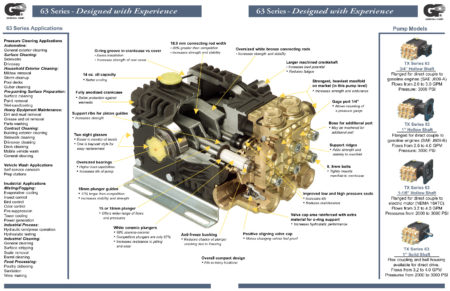
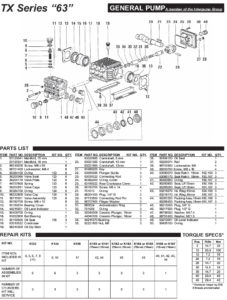
All FanMist Systems use the General Pump TX Series 63 Pumps.  Included in this post are the most important pdf documents for specifications, parts, repair kits, servicing and trouble shooting.  Select the button below to download the pdf’s.

The image below shows a cross section of why General Pump is a leading manufacturer of high quality high pressure pumps used in the humidification industry.

TX Series 63 Pump Specifications, Parts and Repair Kits


General Pump Specs–Parts–Repair Kits pdf General Pump Servicing Instructions pdf

Accessing the Humidification High Pressure Pump and Changing the Oil

By | Pump Maintenance and Trouble Shooting

Accessing the Pump to Change the Oil

You will need to remove the Enclosure Cover which is connected with 8 phillips head screws.  Remove the screws and slightly pull the cover away from the housing on both sides to release from the insulation.  Slide the cover off the housing.

Changing the Oil

Run the pump for a few minutes to heart up the oil so it will flow easier..  Remove the nut on the end of the oil drain hose attached to the side of the bare pump.  Drain the oil.  Put the nut back on the drain hose.  Add oil through the yellow ventilated cap on the top of the bare pump.  Add until about ½ way on the sight glass.


What Can Cause a Humidification High Pressure Pump to Run Rough?

By | Pump Maintenance and Trouble Shooting

Trouble Shooting Cause of the High Pressure Pump Running Rough.

Begin by knowing the pump serial number and manufacture date which are both located on the metal tag attached to the the panel on the side of the enclosure.

Several types of causes can be kept in mind which cause a pump to run ‘rough’.  Try to identify how best to understand what rough means?  Is it loud?  Does the pressure fluctuate or jump while it is running?  Does the noise vary depending on the pumps output pressure?  Are the two pulleys properly aligned?  Is the pump leaking water below the brass head?  How many hours on the pump?  Has the oil ever been changed?

The most likely cause for a ‘rough’ running pump is debris in one of the 6 valves in the pump head.  If the pump is recently installed, small debris from installation such as teflon tape or brass shavings can be the cause.  These valves control the water flow inside the pump head as the pistons move back and forth.  If debris gets caught up in one of the valves, it can cause the pump to run rough.

The valves can be accessed by removing the 6 large bolts (three on top and three on the side) of the brass head.  They should be removed and inspected making sure there is nothing interfering with the function of the valve spring assembly.  This will require a 27mm socket and it is suggested to use a long “breaker bar” to provide additional leverage.  The bolts will be tight.

Once the bolts are removed, use a pair of needle nose pliers to remove the individual valves and the o-ring at the bottom of the port (one valve and one or-ring in each port).  Check the spring assembly to ensure nothing is broken (plastic housing or spring assembly).  If it is, it will need to be replaced.  If not, check for obvious debris that may be preventing the assembly from completely opening or completely closing.  Use compressed air to blow out the valve.  In some cases, the debris may not be noticeable.  Compressed air will assure the valve assembly is cleared.

While the bolts are removed, use compressed air to blow out all of the ports.  They are all interconnected so air into any given port will circulate through the other ports.  In some cases, the debris may have worked its way out of the valve but is still inside the port.  Blowing out the all of the ports will help ensure nothing is left inside.

Put the o-ring and the valve back into each port, thread the bolt back in place and turn the pump on to check the results of the cleaning.

There are occasions where we have to do this several times on our bench at the factory even though there is no visible debris.  It usually is corrected with the first cleaning but may take two or three times to get the debris out.

Other possibilities are low water supply causing cavitation within the pump head or broken or damaged crankcase inside the bare pump.  A detailed explanation of the pumps functional irregularity might help narrow it down.  A video is always helpful.  Images are good but not as useful as a video.


How to Check & Clean Danfoss Stainless Steel High Pressure Humidification Zone 3/2 Way Solenoid Valves

By | Pump Maintenance and Trouble Shooting

Shown are Danfoss Zone Valves
Used in High Pressure Humidification Pumps
for Multiple Zone Applications

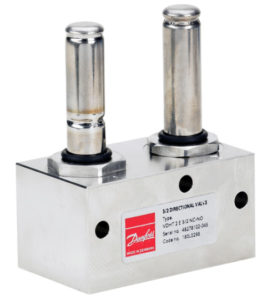
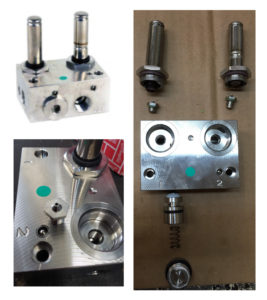
Danfoss 3/2 zone valves include a drain valve.  In the event of malfunction due to debris, the valve can be taken apart and cleaned.

Rinse it as thoroughly as possible, and purge with air if available.  After being cleaned of potential debris, it should be free to open/close 100%.

Images showing the 3/2 valve disassembled to demonstrate the several orifices that should be cleaned.

Danfoss 3/2 Zone Valve for High Pressure Multiple Zone Humidification Pumps

Danfoss 3/2 Zone Valve for High Pressure Multiple Zone Humidification Pumps


Danfoss (Uncapped) 3/2 Zone Valve for High Pressure Multiple Zone Humidification Pumps

Danfoss (Uncapped) 3/2 Zone Valve for High Pressure Multiple Zone Humidification Pumps


Danfoss (Disassembled) 3/2 Zone Valve for High Pressure Multiple Zone Humidification Pumps

Danfoss (Installed) 3/2 Zone Valve for High Pressure Multiple Zone Humidification Pumps


Danfoss (Disassembled) 3/2 Zone Valve for High Pressure Multiple Zone Humidification Pumps

Danfoss (Disassembled) 3/2 Zone Valve for High Pressure Multiple Zone Humidification Pumps

How to Check the Unloader Valve (Pressure Regulator)

By | Pump Maintenance and Trouble Shooting

How to Check the Unloader Valve (Pressure Regulator)
Installed in a “Tri-Plex Plunger Type”
General High Pressure Humidification Pump

High Pressure General Pump Unloader Valve (Pressure Regulator)

High Pressure General Pump Unloader Valve (Pressure Regulator)


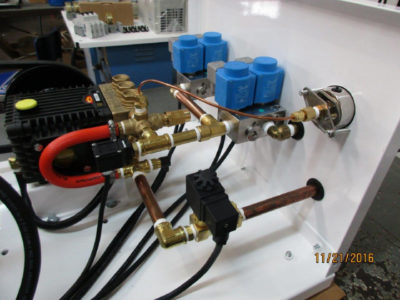
Unloader Valve Installed in High Pressure Pump Station

Unloader Valve Shown Installed in High Pressure Pump Station

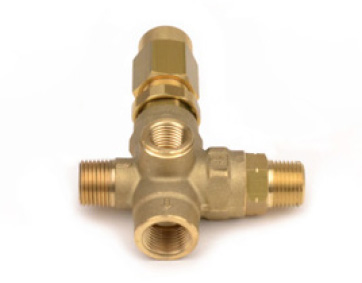
This is a pressure regulator and bypass valve as a combined function in one valve that is plumbed on the outlet side of the pump and allows the pressure output for the pump to be controlled (typically at 1000 psi) AND it allows any excess water from the output to be re-routed back to the pump inlet or to a holding tank depending on the system design.

The unloader valve has seals and excessive bypass through the unloader valve will cause seals to wear prematurely.  Seals should last many years.  Excessive bypass occurs because the pump strains on the output side struggling to maintain greater than 50% output for extended periods of time.  We always seek to design pump size such that no single zone is significantly under 50% output at any time.  The cure for this the inclusion in the pump design of VFD (variable frequency drive).

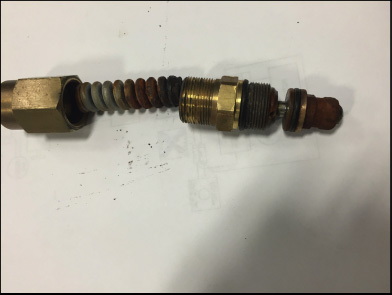
One sign of a defective regulator/unloader valve are pressure spikes.   The pressure may not be constant where a reading can be seen on the pressure gauge – but might be “spiking”.  To inspect the unloader, remove the acorn nut that has a hole in the end of it.   It is located on the output manifold of the pump.  The picture shows what a defective unloader/regulator valve looks like – it will have rust in it or on the spring – and will usually need to be replaced.    If no rust, you can spray WD 40 in it and loosen/tighten to ensure it is freed up.  The pressure should read 1000 psi while in operation.

Checking/Inspecting the Unloader/Regulator Valve if Malfunctioning:

  1. Turn the unit off.
  2. Locate the acorn nut that has a hole in the end of it – it is located on the output manifold of the pump.
  3. Mark how tight the acorn nut is currently threaded on.
  4. Un-thread the nut from the valve completely.
  5. Inspect the thick spring on the inside.
  6. If it is rusted or corroded, it needs to be replaced.
  7. If it is still clean (like shiny or polished steel), thread the nut back on however tight it was.
Defective Rusted Unloader/Regulator Valve

Defective Rusted Unloader/Regulator Valve

Instructions for the Replacement of the Unloader Valve

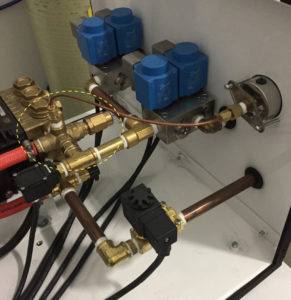
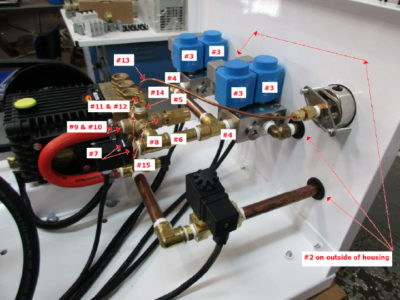
The process to remove the unloader valve involves a sequential removal and reassembly of all components and fittings from the 3/2 valves to the unloader valve.

  1. Take several images of the plumbing before starting making special note of how far each fitting is threaded into its corresponding fitting to ensure everything is properly aligned when the reassembly is completed.
  2. Remove the fittings for the Outlet and Drain ports on the outer side of the housing
  3. Remove the blue coils from the two 3/2 valves noting which set of coils goes to zone 1 and zone 2.
  4. Unthread the two 3/2 valve blocks from the fittings that feed the valves
  5. Unthread the 90-degree elbow/nipple assembly from the brass street T fitting
  6. Unthread the brass street T fitting/nipple assembly from the brass T
  7. Remove the silver clip from the high-pressure switch and remove the switch from its brass base fitting
  8. Unthread the brass T from the unloader valve
  9. Remove the hose clamp from the bypass hose that is attached to the unloader valve
  10. Unthread the bypass hose fitting from the unloader valve
  11. Unthread the compression cap from the fitting that is attached to the top of the unloader valve
  12. Remove the small ferrule from inside the fitting noting the position it is in and set aside.  It will be used when reassembling the fitting.
  13. Push the copper tubing aside
  14. Unthread the base of the compression fitting from the unloader.
  15. Unthread the unloader from the pump.  The extension that is threaded into the end of the unloader valve (that the hexed cap is threaded onto) may have to be removed to provide enough clearance to unthread the unloader valve.
  16. Make sure each fitting has sufficient Teflon tape applied before threading into place.  6 to 8 revolutions of Teflon is recommended for each male thread.
  17. Thread the new unloader in place
  18. The extension on the end of the unloader may have to be removed to provide clearance to thread the unloader into the pump.
  19. Reassemble the plumbing in the reverse order in which it was removed making sure each fitting is threaded approximately the same depth as the original assembly.
Replacing Unloader Valve with Numbered Steps

Replacing Unloader Valve with Numbered Steps

Replacing Unloader Valve

Replacing Unloader Valve