Before service: Isolate power and verify zero pressure. Maximum system pressure: 1,000 psi. Read the safety instructions →
Identification & specifications
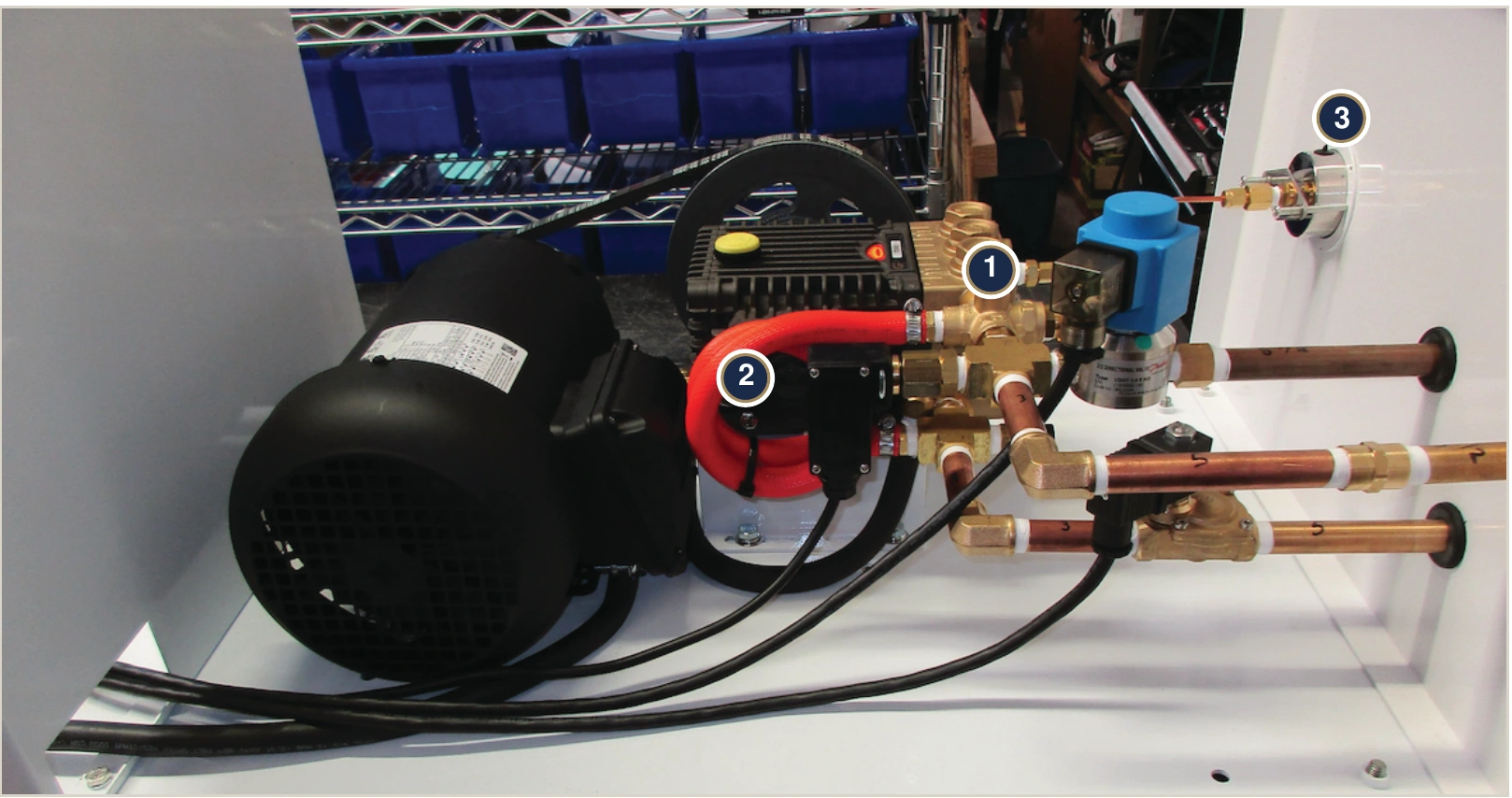
Identify part 93521, its connections and its location inside the pump station.
Identify the valve and connections
The pump discharge, regulated outlet and bypass connections are made at the factory. When replacing the valve, mark and match the connections on the removed valve and preserve its orientation. Do not infer a port’s function from its position in a photograph.
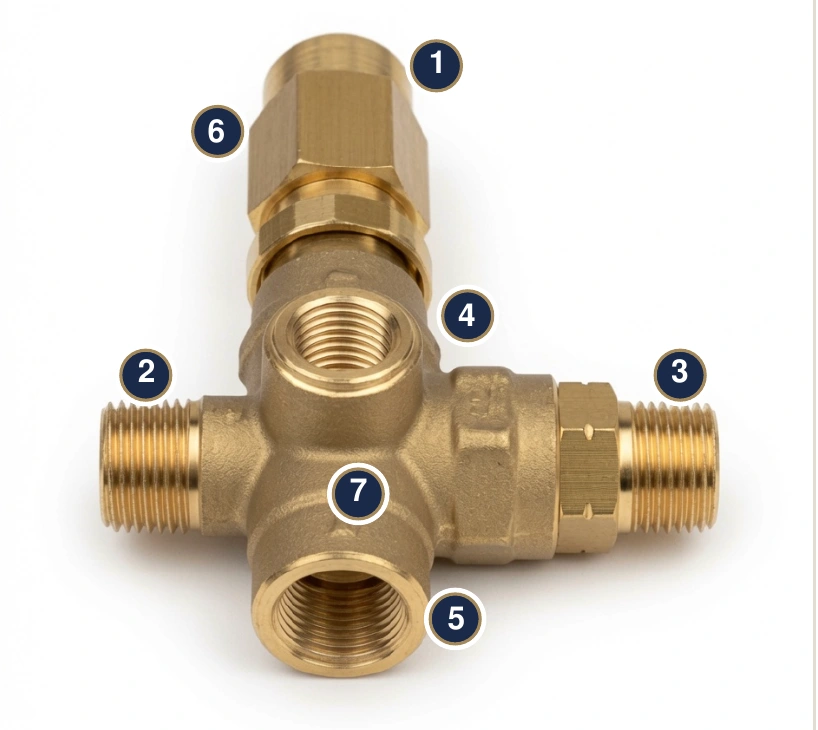
- 1 — Top male port: 3/8-inch MNPT.
- 2 — Left male port: 3/8-inch MNPT.
- 3 — Right male port with hex nut: 3/8-inch MNPT.
- 4 — Auxiliary female threaded port on the top face.
- 5 — Auxiliary female threaded port on the front face.
- 6 — Upper hex wrench flats.
- 7 — Cast brass body containing the spring-loaded regulating valve.
Specifications
The spring-loaded brass unloader regulates pump discharge pressure and returns unused water through an external bypass to the pump inlet. Part 93521 fits all FanMist pump stations.
| Specification | Value |
|---|---|
| Part number | 93521 |
| Type | Spring-loaded, pressure-actuated regulator with external bypass |
| Factory setting | 1,000 psi / 70 bar maximum; adjustable below this |
| Adjustment | Counterclockwise lowers pressure; clockwise raises it |
| Ports | 3/8-inch male NPT |
| Body | Brass |
| Approximate size / weight | 4 × 3 × 3 inches; 0.5–1 lb |
| Location | Pump head discharge / outlet side |
| Water | Clean, treated water with 5-micron filtration |
| Flow guidance | IHC specifies operation down to about half the pump’s rated flow |
Find it inside the pump station
The valve sits on the pump-head discharge. Read regulated pressure at the pump output pressure gauge.
Operation & sizing
Understand pressure regulation, pump bypass capacity and thermal protection.
How pressure regulation and bypass work
The high-pressure pump delivers its rated flow. The nozzles may use only part of it. As discharge pressure reaches the spring setting, the unloader opens its bypass and sends excess water back to the pump inlet, holding the regulated output pressure.
The nozzles mechanically open at approximately 300 psi. The high-pressure safety switch must prove 550 psi within 25 seconds of startup. The factory operating pressure is 1,000 psi maximum.
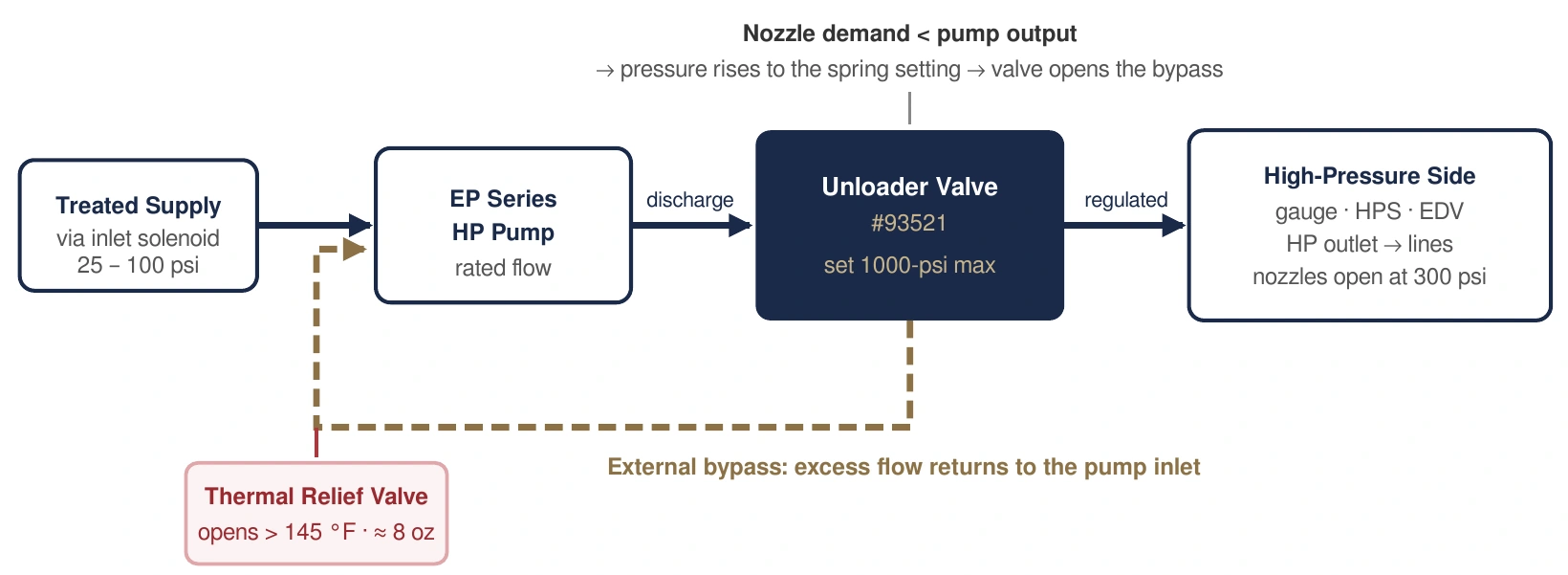
- Forward flow: treated inlet supply → pump → unloader → output gauge, safety switch, drain valve and high-pressure lines → nozzles.
- Bypass flow: excess water → external bypass → pump inlet.
- Thermal protection: if inlet water exceeds 145°F, the thermal relief valve releases water to help cool the supply.
- Heavy, sustained recirculation warms the inlet water and increases wear on the valve and pump.
Pump sizing and thermal protection
IHC recommends 30–40% pump bypass capacity. Bypassing more water increases heat and wear. The guide describes operation down to about half rated flow; sustained bypass above 75% is an extreme condition that can overheat the inlet.
Its worked example uses a 1 gpm (500 lb/hr) pump where actual moisture demand ranges from 0.5 gpm (250 lb/hr) to 0.75 gpm (375 lb/hr). Review pump selection with IHC against the actual system load.
- If pump inlet water exceeds 145°F, the thermal relief valve opens.
- It dumps enough water to help cool the inlet supply, usually about 8 oz.
- It closes and waits until the water again exceeds 145°F.
Service & replacement
Follow the preparation and procedure for the work you need to do.
Before service
Check and adjust output pressure
The valve ships at the factory setting. Leave it as shipped unless the system needs lower pressure. Adjustment is a running check for qualified service personnel; inspection and disassembly require isolation and depressurization.
- Locate the adjustment knob and the pump output pressure gauge.
- With the assembled system running, watch the output gauge. Make small turns and let the reading settle.
- Turn counterclockwise to lower pressure or clockwise to raise it.
- Keep output at or below 1,000 psi. Do not exceed that limit; doing so can overstress the system and void the warranty.
Clean and inspect
The unloader is a wear item. It needs periodic cleaning or replacement, and heavy bypass shortens its service life. Unstable output pressure can be a sign that service is needed.
- Lock out power, depressurize and verify zero gauge pressure.
- Disassemble the valve and inspect for debris and obvious wear on the seals.
- Clean and reassemble, or replace with part 93521 when needed.
- Maintain treated water and 5-micron filtration; the valve is rated for clean water only.
Replace the unloader
- Turn the pump switch OFF and lock out/tag out power. Let the EDV release line pressure and verify zero on the gauge.
- Mark the pump discharge, regulated outlet and bypass connections. Note valve orientation, then unthread the valve.
- Seal the threads on the new 93521 and install it in the same orientation, reconnecting each line to the same port. Retain the supplied factory setting unless lower pressure is required.
- Restore water and power and run a cycle. Check the intended output pressure, maximum 1,000 psi; the red light should go out within 25 seconds. Confirm steady pressure and no leaks.
Troubleshooting
Choose the symptom to see possible causes and what to check.
Troubleshoot the unloader
Follow the isolation instructions above before inspection, cleaning or replacement.
Unstable or fluctuating pressure
- Possible cause
- Debris or worn internal seals
- What to check
- Clean and inspect the unloader; replace 93521 if necessary. Check water treatment and the 5-micron pre-filter.
Pressure fluctuations across the system
- Possible cause
- Clogged pre-filter, scale or leaks
- What to check
- Replace the pre-filter, flush the system and check for leaks.
Thermal relief discharges often
- Possible cause
- Inlet water above 145°F from excessive bypass
- What to check
- Review pump sizing and reduce bypass. Improve inlet-water cooling.
Gauge reads above 1,000 psi
- Possible cause
- Setting raised too far, or valve sticking
- What to check
- Do not operate above 1,000 psi. Qualified personnel should lower the setting counterclockwise or replace the valve. Contact IHC at 765-702-4083.
Pressure will not build or red FAULT light comes on
- Possible cause
- Restricted supply, leaks, a lowered setting or stuck-open bypass
- What to check
- Verify 25–100 psi inlet pressure and inlet-solenoid operation. Check Slip-Lok fittings and the adjustment setting. Clean or replace the unloader as needed.
Pump runs hot or inlet water is warm
- Possible cause
- Sustained heavy bypass; pump oversized for the load
- What to check
- Check pump sizing against IHC’s 30–40% pump bypass capacity guidance. Check that intended nozzles and ball valves are open.
Related parts & references
Find matching parts, related guides and the original technical documents.
Related parts
Original & related PDFs
Web edition of IHC’s Unloader Valve / Pressure Regulator technical data document, Rev B. Applies to FanMist part 93521.